Showing posts with label htmlinterview. Show all posts

Tuesday, 15 December 2020

HTML 5 INTERVIEW QUESTIONS AND ANSWERS 2020


HTML 5 INTERVIEW QUESTIONS AND ANSWERS 2020

Top HTML 5 Interview Questions and Answers


Introduction to HTML


In the world of mark-up languages, HTML 5 has gained its repetition since its inception. HTML stands for the hypertext mark-up language, and HTML 5 is the latest version of HTML. HTML 5 is called the structural block or component of a website. HTML is quintessential to develop and construct a website. Generally, HTML is incorporated with 2 more scripts: cascading style sheets, that is, CSS and JavaScript.


Programmers use HTML 5 to give structure to a website, and along with that, they use CSS to provide the website with a better presentation, while they also use JavaScript that helps the website work and performs normally. 


Why is HTML 5 so popular?


HTML 5 provides such a platform to a programmer that he or she again design any website without using browser plugins. It not only helps in delivering animation for applications, but it also searches well for music, videos, movies, and so on. Apart from all these qualities, one can use HTML 5 to construct highly complex applications that can easily run in any browser. Further, HTML 5 also acts as a cross-platform. In other words, it is supported in a huge variety of devices. From smartphones to smart TVs, HTML 5 can run any webpage seamlessly without interruption. So, this is the reason why HTML 5 is hyped up in the field of software development.


Is HTML 5 better than flash and Silverlight?


It is one of the most frequently asked questions in the field of programming. Well, to answer this question, it is important to look at some facts about HTML 5. Currently, establ five has successfully outshined flash as a markup language for many devices, browsers, and various online platforms. Many websites that work with delivering videos have also adopted HTML over flash. Another factor that also shows another side of HTML that plays HTML 5 Does not involve digital rights management. Most of the content owners are hesitant To use HTML 5 as it does not prevents copying.


However, most of the containers do not choose flash over HTML 5, but they choose silver site over HTML 5. However, recently Adobe has declared that they will not develop the Flash Player for mobile devices anymore. But in contrast, they still have their hold in most of the video contents and web pages. So, there is no such report of Adobe being perished due to the adoption of HTML 5.


So this concludes that even if HTML 5 is being adopted by most of the content owners and creators in the market. But there is still some space for flash and Silverlight in the market. But flash and Silverlight should indeed do something to become marketable enough in the market compared to HTML 5.


How popular is HTML?


As described in the above context, it is clear that HTML 5 is one of the most popular markup languages. And most of the organizations working with web page development software development and other such activities are investing in HTML 5. It has not only gained popularity in the market of web page development. But it has also gained popularity among programmers and content owners. HTML 5 is the widely used markup language for every type of device present in the current scenario. This is the reason why estival 5 has gained global recognition in the field of web page development and software development. There is no such known browser that does not support HTML 5 or any version of HTML. 


After gaining a search level of popularity worldwide, it is important to mark that organizations want their programmers to have expertise in HTML 5. Search type of requirement has increased the demand for programmers with the knowledge and skills related to HTML 5. But to get hired and validate a person's knowledge about HTML 5, various interview sessions take place. These interviews related to sun 5 will verify and ensure that a person has the required level of knowledge and skills related to HTML5. When it comes to interviews related to HTML 5, then people tend to get confused with numerous interview questions for preparation. In this article, we will focus on some of the most important and frequently asked interview questions that will help an idea to prepare for their HTML 5 interview.


Basic HTML 5 Interview Questions and Answers


  1. Why is it important to mention <DOCTYPE HTML> at the beginning of in HTML page?

The doctype HTML Is the command that suggests the version of HTML. Presently this command is used in HTML 5 to suggest the 5th version of HTML at the beginning of the web page. The 4th version of HTML that is HTML 4, had some different types of commands, and it was based on Standard Generalized Markup Language that is SGML. And this is why the prior versions of HTML 5 required a definition of the document type, which is called DTD is Document Type Definition. 


When it comes to HTML 5, it is not important to mention and <!DOCTYPE HTML> anymore. As HTML 5 does not depends upon a DTD. Further, it is not based on Standard Generalized Markup Language, so there is no need to mention <!DOCTYPE HTML>.


  1. What are some of the new structural elements in HTML 5?

 The new structural elements launched in HTML 5 are designed to define various parts of a webpage like an article, <header>, nav, section, aside, and so on. 

A website contains different parts, and each part denotes an important area of a page. This is where these structural elements help build a structure that can be used afterward to develop any web page. There are certain meanings for each of these structural elements. Now let us define each of them:

  • <article>:  the content of any self-contained web page is demonstrated or represented by this element's help.


  • <<header>>: When a web page is designed or developed, then one of the most important things to notice and work on at the beginning is to create a space for HTML <header> data. And this is the element used to represent or demonstrate the <header> data of HTML.


  • <<footer>>: The photo element is basically used to demonstrate or show the <footer> information of any web page.


  • <nav>:  without a proper navigation system, a web page cannot be created as planned. Further, without proper navigation, a user cannot use most of the facilities of any webpage. This is why this element is used in HTML 5 to provide better navigation on the web page.


  • <aside>: This element is used to refer to and define various sections of content into different types of groups.


  1. Why is the article tag used?

 The article tag is used in HTML 5 to provide space that can be distributed without interruption. The article tag is used to create space to enter the body of any article. One can take the example of magazines and newspaper articles. The web pages that contain magazines, newspaper articles, blogs, basically the space for these articles are created with the help of the article tag.


  1. What is the procedure for producing a horizontal line on a webpage?

 HTML has always created and introduce a new type of tags commands in elements that can allow a programmer to work faster in a simple way. When it comes to creating a horizontal line on a web page, it might become difficult for an individual to do so without the knowledge of newly introduced tags by HTML

In HTML 5, one can create a horizontal line using a simple tag that is <hr>. Like any other HTML tags at this tag also does not contains an end tag.


  1. What are the different types of HTML headings?

HTML consist of basically 6 types of headings. Namely, they are H1, H2, H3, H4, H5, and H6. The H1 suggests the highest for the maximum font. On the other hand, the H6 tag suggests the minimum size of the font.


Intermediate HTML 5 Interview Questions and Answers


  1. How would you group heading elements?

Whatever the heading, maybe it is always easy with HTML to group heading elements and tags. The user just has to use the H group tag to group all the heading tags as per their requirements.

For instance, programmer can type the H group tag Then they should make the list of heading the want to group. And at the end the list by adding H group tag again:

<hgroup>

  • <h2> Subheadings </h2>
  • <h3> heading under the sub-heading </h3>

</hgroup>

This is a small example of how a programmer can group heading elements by using the H group tag.


  1. What do you mean by <span> tag?

Generally, the <span> tag is ah defined as an inline container. The <span> tag is used to markup a particular part of any text or any document. Find instance, in any document, and we find highlighted portions written in a different color.

The manipulation of <span> tag is possible with the help of JavaScript. At the same time, the styling of the <span> tag is only possible by making use of CSS. The JavaScript uses class or ID attributes to manipulate the <span> tag. 

When it comes to comparison then <span> tag can be compared with <div> tag. It is said that <span> tag is quite similar to <div> tag. But <div> tag is a block level element whereas the <span> tag is an inline level element.

  1. What do you mean by <meta> tags?

The <meta> tags can be defined as the data about an HTML document. Metadata consists of the required and important information about the HTML data.

Demeter tags are always entered inside the head element. They are generally used to suggest or demonstrate a set of characters, description of a page, keywords, information about the author of an HTML document, and settings related to the viewport. 

The metadata is not shown On any webpage, as it is designed for the machine to read it. This is such information that helps a browser to learn about displaying certain contents and reloading pages. In search engines, the metadata helps the search engine learn about the keywords and search related topics and links.


  1. Describe the best way to group form elements?

There are a variety of methods to structure and group form elements. Also, grouping form elements depends upon the purpose and aim of the user. The most common way to group form elements is using the <fieldset> tag. When the fieldset tag is used, it requires another tag in it, and the purpose of another tag will be to provide or deliver a title to the group elements.


  1. Name some of the input type attributes that are new in HTML 5?

First of all, the <input> tag can be defined as an input field where users can enter any type of data they want to. The <input> tag helps a user enter data like date, checkbox, email, color, image, radio, reset, search, submit, till, text, time, URL, week, etc. However, the elements can be represented in various types of ways. And the representation of elements depends upon the type of attributes that are used while forming such elements.


  1. Is it possible to insert a Copyright symbol on a web page? How is it done?

Yes, it is possible to insert the Copyright symbol on a web page. Insertion of the corporate symbol in the web page highly depends upon the editing tool one uses. To add the Copyright symbol using HTML, one has to use the HTML entity reference type and copy. This is the place where a user can add a Copyright symbol.


  1. What do you mean by hyperlink?

Hyperlinks are those links that allow a person or user to jump from one web page to another page just by one click. When the mouse's cursor is brought near any hyperlink, it turns into a hand symbol, which allows the user to click on the link to reach a specific page. It is not important that a link has to be a text or something specified as a text. Rather hyperlinks can be an image or something beyond the text.


  1. What do you mean by semantic elements in HTML 5?

The semantic element can be defined as an element that provides both the browser and the developer its meaning in a clear form. Examples of semantic elements can be <form>, <table> and <article> and so on, which clearly defined what the content should be inserted after these elements.


Advanced HTML 5 Interview Questions and Answers


  1. Can you list some of the semantic elements in HTML 5?

There are many types of semantic elements present in the HTML 5. each of the semantic elements are responsible to describe and define each part of a webpage. It is next to impossible for a developer to define various parts of web page without using the semantic elements some of the most common and popular semantic elements that are used in designing web page are:

  • <Article>
  • <figcaption>
  • <aside>
  • <main>
  • <section>
  • <summary>
  • <figure>
  • < time>

So, these are some of the most used semantic elements in HTML 5 web page development.

Continue Reading


Friday, 20 November 2020

HTML INTERVIEW QUESTIONS AND ANSWERS 2020


Most Commonly Asked HTML Interview Questions and Answers


HTML is known as the most widely used language found on the web. It is widely used for developing new web pages.  The HTML helps in developing more functions in the world of web development. This helps in increasing your skills in the field of web development. So, when you are going to start your career in the field of HTML, it’s very important that you must know some basic points and rules. When you sit for the exams, it’s completely depends on your knowledge that how much you can write and succeed. But, when you are going to attend interviewsyou must prepare well for the basic HTML interview questions and answers


Let’s get started with top interview questions and answers that will help you in clearing HTML interview questions.


This is a list of best interview questions and answers of HTML. So read it till the end to get clear idea of patterns of HTML interview questions asked in interviews.


Basic HTML Interview Questions


What do you mean by HTML?

HTML is known for Hyper Text Markup Language.  This language is widely popular and known in the field of World Wide Web.  It is one of the standard texts formatting language system that is critically used for creating and displaying different pages on the web world.  The work of HTML is to make the text look more interactive and dynamic. The HTML helps in turning the test into more image based, make it in tabular format. It also helps in creating links. You can save the HTML page by adding .html or .html in the required web page.

What are the differences in between html elements and HTML tags?

A HTML element is given to an individual component of HTML web pages. It can also be given to the HTML documents. It helps in predicting the meaning or semantics. For example you can give the title elements that can give you the title of the document.  In the other hand, tags mean the root of HTML documents which are widely used for specifying the HTML document. For example you can use the head tags for all those head elements in the HTML file.


What are the different attributes and how do you use them?

You can find these types of many interview questions and answers in the interview.

The answer to this questions is every alternative tags has additional attributes.  The tags are helpful in changing the way the tags behave or tags displayed. The tags input play different roles in different space. You can specify the tags input in a text field, in a check box, in a radio button or you can find these in more options also. Attributes are specifically directed after the use of tags. It is typed inside two angled brackets.  The attributes should only appear in the opening or self-closing tags.  There can never be closing tags.


Intermediate Level HTML Interview Questions


What differences you can find in between a block-level element and inline elements?

Coming to the differences you have to answer regarding the block level and inline elements.

Block level elements is drawn for the block which is used stretch and full fill the width available. It means you will be stating the new line. The elements of the block-level are, <div>, <img>, <section>, <form>. The inline elements are also drawn where they defined and take only the absolutely needed space.  The easiest way to know it by text flows. Examples like <span>, <b>, < strong>, <a>.

When do you use comments in HTML?

 For better understanding of the HTML you can use the code comments.  These comments are neither used in browser nor are it displayed in the browser.  You can get the help in noting yourself and other developers in the HTML section.

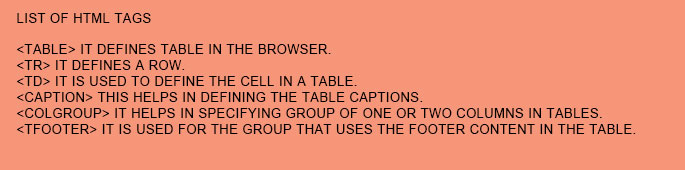
What are the different tags used to display the data in the tabular form?

This is a usually asked HTML interview questions. You can expect this question in your interview questions and answers segment. The answer must be proper and appropriate.

 list og HTML tags

How can you create a hyperlink in HTML?

In HTML you can provide the hyperlink. This hyperlink helps in linking one page to another.  The HTML helps in providing anchor tags. These tags can be found in following ways. They are like unvisited link which means it is displayed and is underlined in blue. Next is visited link that is it is displayed and underlined in purple colour. The last one is active link that is displayed and underlined in red.

What are the common lists while we go for designing a page?

There are three lists that can be named as for designing a page. They are ordered list which means the ordered list helps in displaying the elements in numeric formats. The unordered list comes which the displayed elements that are in bulleted format. The definition list helps in listing the display elements in form like dictionary.

These types of HTML interview questions can be asked in the interview segments. You have to clearly know about the HTML segments. This will help you to excel in front of the interviewer.

What do you mean by semantic HTML?

The semantic HTML is known for the coding style.  It is there for the use of HTML markup. It helps in reinforcing the semantics or the meaning of the comments given by the HTML.  There are different tags that are used for giving the bold tags, italic tags and many more.

What do you mean by image map?

The image mapping is done for linking various web pages by using only a single image.  The tag which is used for image map is <map>. Here, you get the chance to change the shape of the image. You can include them as a part of image mapping also.

Hyperlink, can we apply it to text?

 There are no hyperlinks that can be used in both texts and images. The tag of HTML anchor tag helps in linking from one page to another. In anchor tag “href” tag is considered to be the most important attribute in HTML.

What do you mean by style sheet?

In this HTML interview questions, you need to describe it completely. In style sheet you get to build consistent and mrerely transporatable style templets. You also get the advantage of getting well- designed style templates. Here, theses style templates helps in adding style to the different web page. It helps in formatting and documenting the written markup language.

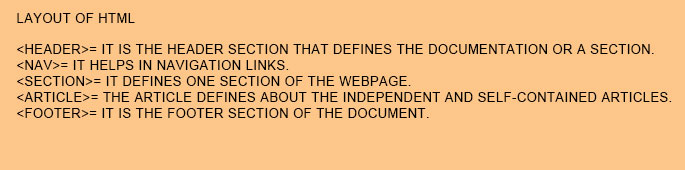
Describe about the layout of HTML?

 The layout is something that helps in making the page look arranged. Every page has its specific layout. The specific layout helps in maintaining the display content in specific manner.  Here we will give you some parts of webpage.

Layout of HTML


What do you mean by marquee?

 The marquee is used for scrolling the text. It is used for scrolling the text in the web page. It helps in scrolling the image or scrolling the text up, text down or to the text left or right automatically. Whichever text you want to scroll down, you must tag <marquee> for better experience.


What are the different tags that are used for separating the section of texts?

There are three different tags that are used for separating the texts.

<br> tag, this tag is usually used for separating the line . It helps in breaking the current lines and helps in conveying the next lines. The <p> tags helps in texting in a new paragraph. The <blockquote> tag helps in defining the large quoted section.


What do you mean by DIV and SPAN in HTML?

Mostly in the HTML interview questions, you get the question regarding the difference. This gives the interviewer a clear idea about your skills and knowledge. So you can give the answer like the difference in between the span and div. The span and div is that span elements   that is used within an in-line. It is basically used for the chunk of HTML.  The div or division element is used in block –line. This div is very equivalent to have line-break before or after. The span and div can also be used in larger chunks of code.


Why do you use alternative texts in images?

For defining the image, we mostly use the alternative text. When you go for image mapping, there are most of the time, when you get the confusion and difficulty about the hotspots. You get confused about the links. In those cases, you can use the alternative text. Here this alternative comes into action. You can put the description of the links that will help in  making it easy for the users to find and understand what actually the hotspots are and how it is linked.


Do you consider the <!DOCTYPE html> tag as the HTML tags?

No, in HTML we don’t consider <! DOCTYPE html> html tag.


Why there are URL encoded in the HTML?

 For sending an ASCII, we always require the use of URL. YRL is used for converting the non-ASCII characters into the readiable format. This format helps in using it over the internet. Through URL we can sent the ASCII character to set only.  The non-ASCII characters get replaced with the “%” tags, which is followed by hexadecimal digits.


What entities do you use for the HTML?

The entities that are used in HTML are for the reserved character. You can easily replace the character which is not present in the keyboard. You can replace the character as it is quiet reserved in the HTML language.


How can you create multi-coloured text on web pages?

 We can definitely create multi-colour text on the web pages.  For creating the multicolour text you can use the tag <font color =”color”> </font> for colouring the texts.


What is the benefit of using span tag?

Span tags is used for the adding colour on the text, adding colours to the background, adding text to the background and highlighting  any colour for your texts.


What kind of advantage do you find in collapsing white space?

The white spaces are known for the blank space. These are the sequences for the blank space character.  This is used as the single space character.  You can find the browser is getting collapsed a number of times, for multiple space to single space.  There you can draw the lines of text for the multiple spaces.  This helps in organising the HTML code for many such readable formats.


How can you keep the list elements straight in HTML file?

 You can use the indents for keeping the list of elements in straight way.  If you are indented to list further for the parent list, then you have to look for the various lists and elements that are all for thecontains.


When do you use the appropriate frame?

 By using frames you can make the navigation look easier.  If you are putting the main links in the sites, in particular frame, then you must find it easier for the navigation.  You can find the link in the top or along the edge of the browser.  You can also find the remainder of the browser in the display board.


Define briefly about the local storage and session storage objects?

This often found in HTML interview questions, the interviewer mostly looks for the  interview questions and answers where a candidate must look for the comparisons. The main differences you can find now in this question are, the local storage object looks for data storage that comes with no expiry dates.  You should know that the session storage object only stores the data for the one session only. In case of a local storage object, the data is not going to get delete when the browser is closed. But, you should take it in mind that the data get deleted whenever there is a closer of the window.  The session storage data is accessible in current window only.  But you can store the data of local storage in the multiple window of the browser.


What will be the consequences when you open the external CSS files in browser?

 Whenever you try to get asses into the external SS files in browser, you cannot assess the files easily through the browser.  This happen because the files have the different extensions. The one and only way of using the external CSS file is for referring the <Link/> tag.  This tag gets involved with the other HTML documents.


What hierarchy style do you follow when it comes to style sheets?

 In a single selector, there are total of three different styles. The style definition which is most closest to the actual tag is known as the precedence.  You can find there is a takeover of inline style more over the embedded style sheets. The embedded files sheet takes over the priority of the external style sheets. You can guess the right answers in that way.


 How can you create text on the web pages, when you are allowed for the sending the email?

In HTML interview questions, segment, there will be most of the moments when you have to describe the functions system. Here also you get same types of question.  In this questions the answers could be like if you are willing to change the link into the clickable link, that you can use in sending the email. Then you will definitely need to use mailto which is under the command of href tag.   In simple words you can also answer this question.


Advanced HTML Interview Questions and Answers


How can you differ in active link from normal link?

You must know the colour of the normal and active links is blue.  There are some users those you identify the active link only after moving the mouse cursor over the link.  There are other users that look for the active links when they get the sign of focus on it.  When you find there are no mouse cursor over the link, they you must know that they are normal links.


When you can find the instances of text must appear outside of the browser?

 You can find the text getting wrapped within the browser window.  It is by default.  If you see the text is currently a part of the table cells, then you can extend the text beyond the browser window.


What advantage do you get by grouping the several checkboxes together?

There is no affect of the check boxes for one another.  But when you group them, then you can find the different in the checkboxes.  The checkboxes can have their name individually and they do not belong to any of the group.  You can find in single web pages there are lots of checkboxes around.


Does it hamper the text when you do not have any tags in between the text?

There is no need of formatting, when you do not have any tags in between the texts.  Therefore there will be no requirements of the formatting. There is no need of any tags in between the texts.


What are the limits of text in the field size?

You can find around 13 character size as the default size of the text field.  If you want you can minimize the size value as possible as you want.  The maximum size if the text gets determined by the browser width.  If the size attributed is set to 0 then the defaulter get automatically changed to 13.


What relationship do you find in between border and rule attributes? Continue Reading